
Faster blockchain intelligence via command-line tooling
Most of our work at Iknaio happens in Pathfinder
, but a non-trivial amount of analysis is faster in a terminal: enriching a CSV of customer deposit addresses, triaging a list of transactions exported from an internal tool, or chaining a quick “give me the cluster of every output of this transaction” query into a report. That is what the graphsense CLI
is for — the command-line client shipped with the graphsense-python package, a pipe-friendly companion to the GraphSense API that speaks JSON, CSV and plain text natively and composes nicely with jq, curl and the rest of your shell toolkit.
This post is a hands-on tour. Every command below is meant to be copy-pasted. You will need a GraphSense API key — set it once in GRAPHSENSE_API_KEY and the CLI will pick it up automatically.
Install
The CLI ships inside the graphsense-python package. We install it with uv
— a fast Python package manager that drops the graphsense command onto your PATH in its own isolated environment, so it never collides with anything else. If you do not have uv yet, one line gets it:
curl -LsSf https://astral.sh/uv/install.sh | sh
Then install the CLI and point it at an instance:
uv tool install 'graphsense-python[cli]'
export GRAPHSENSE_API_KEY=...                   # your key
export GRAPHSENSE_HOST=https://api.iknaio.com   # or your private instance
graphsense --help
A first lookup
The flat commands cover the queries you reach for most often. A single address:
graphsense lookup-address btc 1A1zP1eP5QGefi2DMPTfTL5SLmv7DivfNa \
  --with-tags --with-cluster
You get back a JSON document with balance, first/last seen, tags, and the cluster the address belongs to. Switch to a different format with -f:
graphsense -f csv lookup-address btc 1A1zP1eP5QGefi2DMPTfTL5SLmv7DivfNa
That’s the same query, written as CSV. Nothing else changes.
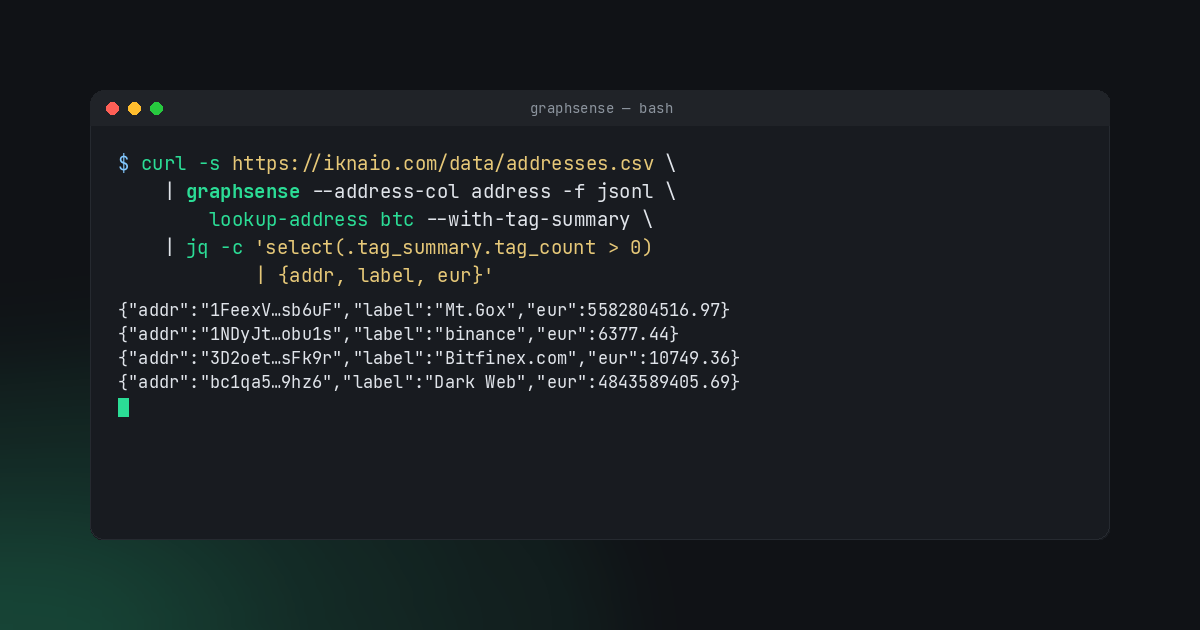
For a taste of what composes, here is the same lookup applied to every address in our sample CSV, filtered to the labeled ones, with the balance projected in both BTC and EUR:
curl -s https://iknaio.com/data/graphsense-commandline/addresses.csv \
  | graphsense --address-col address -f jsonl \
      lookup-address btc --with-tag-summary \
  | jq -c 'select(.tag_summary.tag_count > 0)
           | {addr: .address,
              label: .tag_summary.best_label,
              btc: (.balance.value / 1e8),
              eur: ([.balance.fiat_values[] | select(.code == "eur") | .value][0])}'
The rest of the post unpacks what each piece of that pipeline does.
From a CSV of addresses
The realistic case is that you have a list of addresses from somewhere — an export from an internal tool, a watchlist from a partner, a column pulled out of a spreadsheet. Download our sample file to follow along:
curl -O https://iknaio.com/data/graphsense-commandline/addresses.csv
head -3 addresses.csv
address,id,seen
1A1zP1eP5QGefi2DMPTfTL5SLmv7DivfNa,A1001,2026-05-04
1F1tAaz5x1HUXrCNLbtMDqcw6o5GNn4xqX,A1002,2026-05-04
Tell the CLI which column to pick up and pipe it in. -f jsonl produces one JSON object per line, which is the friendliest format for further jq work:
cat addresses.csv \
  | graphsense --address-col address -f jsonl \
      lookup-address btc --with-tags --with-tag-summary \
  > enriched.jsonl
There are a few things going on here worth pointing out:
--address-col addresstells the CLI which column of the incoming CSV holds the lookup key. The other columns (id,seen) are ignored on the way in but the CLI remains happy to round-trip your data through-d DIRif you want one file per record.- The CLI auto-detects that there are ten rows and ≥10 records flips it into bulk mode under the hood — instead of ten separate API calls it issues one
/bulk.jsonrequest. That threshold is configurable (--bulk-threshold N, or--no-bulkto force per-record calls). --with-tags --with-tag-summaryadd the attribution data we are about to filter on. Thetag_summaryblock is the cheapest way to ask “is this address attributed to anyone at all?”.
CSV is the lingua franca, but it is not the only thing the CLI knows how to read. Plain newline-separated ids work as-is, JSON inputs pair with the --address-jq JMESPath selector, and Pathfinder’s .gs investigation exports have a dedicated set of graphsense gs commands of their own. We come back to those once the basic pipeline is in place; see Continuing a Pathfinder investigation in the terminal
below.
Filter and transform with jq
jsonl and jq are the right combination for filtering. Keep only the addresses with at least one tag, and pick out the bits we actually want — the address itself, its label, and how much it holds:
jq -c 'select(.tag_summary.tag_count > 0)
       | {addr: .address,
          label: .tag_summary.best_label,
          tags: .tag_summary.tag_count,
          balance_btc: (.balance.value / 1e8)}' enriched.jsonl \
  > interesting.jsonl
{"addr":"1FeexV…sb6uF","label":"Mt.Gox","tags":42,"balance_btc":79957.26858281}
{"addr":"1NDyJt…obu1s","label":"binance","tags":94,"balance_btc":0.09133811}
{"addr":"3D2oet…sFk9r","label":"Bitfinex.com","tags":47,"balance_btc":0.15395293}
{"addr":"bc1qa5…9hz6","label":"Dark Web","tags":15,"balance_btc":69370.18443669}
...
Eight addresses out of ten light up. That is the whole point of the pipeline: each stage does one job, the formats line up, and you can pull pieces in or out without rewriting the others.
The intermediate enriched.jsonl was useful for inspection but is not load-bearing — the two stages compose directly. Here is the full pipeline in one shot, CSV in, projected JSONL out:
cat addresses.csv \
  | graphsense --address-col address -f jsonl \
      lookup-address btc --with-tag-summary \
  | jq -c 'select(.tag_summary.tag_count > 0)
           | {addr: .address,
              label: .tag_summary.best_label,
              tags: .tag_summary.tag_count,
              balance_btc: (.balance.value / 1e8),
              balance_eur: ([.balance.fiat_values[] | select(.code=="eur") | .value][0])}'
{"addr":"1FeexV…sb6uF","label":"Mt.Gox","tags":42,"balance_btc":79957.26858281,"balance_eur":5582804516.97}
{"addr":"1NDyJt…obu1s","label":"binance","tags":94,"balance_btc":0.09133811,"balance_eur":6377.44}
...
The same lookup-* family also includes lookup-cluster, lookup-tx, search and statistics. They all accept the same forms of input — piped, -i FILE, or passed directly on the command line — the same -f json|jsonl|csv output formats, and the same auto-bulk behaviour. The cost of learning one of them is most of the cost of learning all of them.
Continuing a Pathfinder investigation in the terminal
Most investigations begin in Pathfinder , where the graph is the right tool: you click through neighbours, build out a few hops, see who the suspects connect to. After a while you start to feel the limits of the canvas. The trace has grown into a few hundred outputs, the same exchange shows up on twenty branches, and the question shifts from who connects to whom to across everything I have surfaced so far, where did the money actually go?. Pathfinder is honest about that: tags and balances are visible on every node, but it is not the place to rank, total or report. That is a terminal job.
Pathfinder exports the current investigation as a .gs file: a portable container with the addresses, transactions and the edges between them that you have brought into view. A set of graphsense gs commands opens it and emits the underlying records in the usual JSON / JSONL / CSV shapes — so the export drops straight into the same pipelines you have been using all along.
First a sanity check — what’s in the file?
graphsense gs summary investigation.gs
That prints a small summary — the kind of save file, its name, and counts of addresses, transactions, annotations and edges — enough to confirm you grabbed the right export. To pull the actual records out there are two extractors, each producing uniform {network, id} rows that are pre-deduped:
graphsense gs addresses investigation.gs   # every address node
graphsense gs txs       investigation.gs   # every transaction
The output respects the global -f / -o / -d flags, so the natural composition is “extract → look up → rank”. A worked example: you have spent the last hour pulling threads in Pathfinder and you want the top destinations of money in the case so far — the addresses that have received the most, with their attribution where there is one.
graphsense -f csv gs addresses investigation.gs \
  | graphsense --address-col id --network-col network -f jsonl \
      lookup-address btc --with-tag-summary \
  | jq -c '{addr: .address,
            label: (.tag_summary.best_label // "—"),
            received_eur: ([.total_received.fiat_values[]
                            | select(.code=="eur") | .value][0])}' \
  | jq -s 'sort_by(-.received_eur) | .[:20] | .[]'
The {network, id} shape is deliberately what the downstream lookup-* commands expect: --address-col id picks up the identifier, --network-col network provides the per-row currency (with the trailing btc as a fallback for any blank rows). Swap the first command for gs txs to drive lookup-tx — the rest of the pipeline does not change.
From the same building blocks you can answer a whole family of questions the graph won’t:
- Total EUR received by every tagged exchange address in the case — pipe the same lookup output into
jq 'select(.tag_summary.broad_category=="exchange") | .total_received.fiat_values[] | select(.code=="eur") | .value' | paste -sd+ | bc. - Which visible addresses are also on an external watchlist —
gs addresses … -f csv | sort | join -t, watchlist.csv -. - A CSV evidence pack with current balance, first/last seen and best label for every visible address — same first two stages,
-f csv -o evidence.csv.
If you ever need to see what is actually in the export, graphsense gs decode investigation.gs prints the decoded JSON in full, and --raw gives you the unstructured version for other tools.
The result is a feedback loop between the two tools: explore in Pathfinder until the graph stops carrying its weight, export, finish the question in the shell, and feed the answer back into the next round of tracing.
Combining with other data sources
The interesting questions in blockchain analytics rarely live in a single dataset. You have an internal watchlist, a sanctions list from a public repository, a transaction feed from your own node, block data from a public explorer, a partner’s spreadsheet — and the question you actually want to answer needs two or three of them stitched together. Because the CLI reads CSV, JSON and plain lines the same way, anything that produces those shapes is one pipe away from a GraphSense lookup.
To make that concrete, here is a small but realistic combination: take the latest Bitcoin block from the public mempool.space explorer, hand its output addresses to GraphSense, and surface the labeled ones. We pin a fixed block — number 800000 — so the example is reproducible.
HASH=00000000000000000002a7c4c1e48d76c5a37902165a270156b7a8d72728a054   # block 800000

curl -s "https://mempool.space/api/block/${HASH}/txs" \
  | jq -r '.[].vout[].scriptpubkey_address // empty' | sort -u \
  | graphsense --input-format lines -f jsonl \
      lookup-address btc --with-tag-summary \
  | jq -c 'select(.tag_summary.tag_count > 0)
           | {addr: .address, label: .tag_summary.best_label,
              tags: .tag_summary.tag_count}'
A few seconds later you have every labeled address in that block:
{"addr":"173bVm…vPFg","label":"Dark Web","tags":14}
{"addr":"1FWQiw…McGd","label":"Bitget","tags":45}
{"addr":"1Kr6QS…9i1g","label":"bitfinex","tags":87}
{"addr":"3KZDwm…Zoxb","label":"Carbon Negative (mining pool)","tags":5}
{"addr":"bc1qpr…vpxk","label":"Robinhood","tags":13}
...
Same trick with the CLI’s built-in JSON projection — --address-jq runs a JMESPath query on incoming JSON, so we can skip the intermediate jq -r if we want a single pipe:
curl -s "https://mempool.space/api/block/${HASH}/txs" \
  | graphsense --address-jq '[].vout[].scriptpubkey_address' \
      -f jsonl lookup-address btc --with-tag-summary
--address-jq for JSON, --address-col for CSV — same idea, format-appropriate selector. Both leave the rest of the pipeline unchanged.
Putting it all together, the labeled addresses in block 800000 with their EUR balances, in one command:
curl -s "https://mempool.space/api/block/$(curl -s https://mempool.space/api/block-height/800000)/txs" \
  | graphsense --address-jq '[].vout[].scriptpubkey_address' \
      -f jsonl lookup-address btc --with-tag-summary \
  | jq -c 'select(.tag_summary.tag_count > 0)
           | {addr: .address,
              label: .tag_summary.best_label,
              tags: .tag_summary.tag_count,
              eur: ([.balance.fiat_values[] | select(.code=="eur") | .value][0])}'
{"addr":"1Kr6QS…9i1g","label":"bitfinex","tags":87,"eur":124895586.02}
{"addr":"1FWQiw…McGd","label":"Bitget","tags":45,"eur":66035703.14}
{"addr":"3KZDwm…Zoxb","label":"Carbon Negative (mining pool)","tags":5,"eur":1354892.16}
{"addr":"bc1qpr…vpxk","label":"Robinhood","tags":13,"eur":156165.30}
...
Change 800000 to any block height and you have a different question answered by the same pipeline. Swap the data source entirely — a sanctions list from a public repository
, an internal watchlist exported to JSON, a wallet provider’s webhook payload — and the structure of the command does not change. Whatever produces a line of addresses or a JSON document with addresses in it composes with GraphSense the same way.
From pipeline to report
When you do want to keep an artefact, the output side is symmetric. Write CSV with -o:
cat addresses.csv \
  | graphsense --address-col address -o enriched.csv \
      lookup-address btc --with-tag-summary
Or one file per record with -d — handy when you want to feed the JSON into another tool downstream:
cat addresses.csv \
  | graphsense --address-col address -d out/ \
      lookup-address btc --with-cluster --with-tags
ls out/ | head
# 1A1zP1eP5QGefi2DMPTfTL5SLmv7DivfNa.json
# 1F1tAaz5x1HUXrCNLbtMDqcw6o5GNn4xqX.json
# ...
Escape hatch: raw API
The flat commands cover the common path. Everything else hangs off graphsense raw, which mirrors every method of the generated client one-to-one and inherits the same I/O machinery:
graphsense -f csv -o txs.csv raw addresses list-address-txs btc \
  1A1zP1eP5QGefi2DMPTfTL5SLmv7DivfNa --pagesize 50
When the API gains a new call, raw picks it up the moment you uv tool upgrade graphsense-python. There is no separate client release to wait for.
Where this fits
We use the graphsense CLI for the messy middle of investigations: the parts where Pathfinder is overkill but a notebook is overhead. The combination of one tool that speaks every common shape and Unix pipes for the glue turns a fair number of ad-hoc analyst questions into one-liners you can drop into a runbook.
The CLI is open source and ships with the rest of graphsense-lib . The command reference is the place to look when you want to know which options a given command takes; everything in this post is built out of the pieces documented there.